Nokia 808 PureView with 41MP cam
After many days, I am posting on this blog about an awesome cellphone announced by Nokia. Nokia has come up with a new cell phone Nokia 808, PureView which has a unique feature of 41 Mega pixel camera. Yeah its true a stunning FOURTEEN MEGA PIXEL CAMERA now on the smartphone. All the other Mobile manufacturer's were taking over Nokia in one or the other feature, So Nokia announced 808 PureView, with a unique feature which none can forget for a long time.
I shall say Nokia 808, PureView is a 'Mother of all Cameras' .It has groundbreaking 41 MP image quality with Carl Zeiss lens, and it comes with a new feature of PureView imaging technology. So, Now talking about its Operating System and and CPU. It has a 1.3GHz single core CPU and 512 MB of RAM, which isn't that cool , because in this current world we are having quadcore and dual core smart phones .Clear Black AMOLED display underneath Gorilla Glass, which allows for a big clear view of what’s going on, under any lighting conditions.

Nokia 808 runs on Symbian Belle Operating system, I shall say that its quite strange that still Nokia 808 is using Symbian instead Windows 7.5 or so. It has 16GB internal Memory and has NFC[Near Field Communication] capabilities . The PureView has a 4inch and HD display ,With a resolution of 360 x 640, which isn't that cool around.


Now coming to, the coolest feature which made so much buzz , 41MP camera which is the best in the world. Nokia 808 made a super buzz and just stole MWC 2012 show.
It has 1080p Full HD video recording with up to 4 x lossless zoom that’s smooth and completely silent. It has powerful Xenon flash and LED video light on your side, so you're ready to catch spontaneous moments after dark.

In Nokia 808 we can shoot photos and videos at 2 megapixel, 5 megapixel, 8 megapixel all the way up to 38 megapixels for the best quality.The Nokia 808 PureView features a 41-megapixel sensor which essentially means that you can zoom in up to 3X without losing any of the details in your shot – and there’s no artificially created pixels in your picture, either.Its quite a lot boost about the camera. Now lets move to its new audio features.
Features of Nokia 808, PureView:
I shall say Nokia 808, PureView is a 'Mother of all Cameras' .It has groundbreaking 41 MP image quality with Carl Zeiss lens, and it comes with a new feature of PureView imaging technology. So, Now talking about its Operating System and and CPU. It has a 1.3GHz single core CPU and 512 MB of RAM, which isn't that cool , because in this current world we are having quadcore and dual core smart phones .Clear Black AMOLED display underneath Gorilla Glass, which allows for a big clear view of what’s going on, under any lighting conditions.

stunning Nokia 808
Nokia 808 runs on Symbian Belle Operating system, I shall say that its quite strange that still Nokia 808 is using Symbian instead Windows 7.5 or so. It has 16GB internal Memory and has NFC[Near Field Communication] capabilities . The PureView has a 4inch and HD display ,With a resolution of 360 x 640, which isn't that cool around.

NOKIA'S 41MEGA PIXEL CAMERA :

Now coming to, the coolest feature which made so much buzz , 41MP camera which is the best in the world. Nokia 808 made a super buzz and just stole MWC 2012 show.
It has 1080p Full HD video recording with up to 4 x lossless zoom that’s smooth and completely silent. It has powerful Xenon flash and LED video light on your side, so you're ready to catch spontaneous moments after dark.

In Nokia 808 we can shoot photos and videos at 2 megapixel, 5 megapixel, 8 megapixel all the way up to 38 megapixels for the best quality.The Nokia 808 PureView features a 41-megapixel sensor which essentially means that you can zoom in up to 3X without losing any of the details in your shot – and there’s no artificially created pixels in your picture, either.Its quite a lot boost about the camera. Now lets move to its new audio features.
Nokia's Dolby Digital System:
Nokia 808 PureView comes with 5.1 Dolby Digital Sound technology, and which also records sounds without distortion at audio levels as high as 140dB. And it’s the world’s first device to include High Amplitude Audio Capture.This combines a unique digital microphone and Nokia algorithms to record distortion-free audio at levels of up to 140 dB, which is quite amazing !!.

Finally , Nokia 808 isn't seem to be coool with 41 MP!!!!!... Rumours say that It is expected to release in the month of May , in RED, BLACK and WHITE. And Estimated Price shall be around 25000-35000INR, which isn't that costly with 41 MP cam. Get a one and experience the amazing shots of 808 with 41MP.

Finally , Nokia 808 isn't seem to be coool with 41 MP!!!!!... Rumours say that It is expected to release in the month of May , in RED, BLACK and WHITE. And Estimated Price shall be around 25000-35000INR, which isn't that costly with 41 MP cam. Get a one and experience the amazing shots of 808 with 41MP.

 Read More
Add your Comment
0
comments
Read More
Add your Comment
0
comments
[How to] Disable an application from Startup
This is a small tutorial about, How to remove any annoying applications from start up.
Your PC is starting up slowly?.. Are you bugged by waiting for a long time for your PC to load?.. Or some annoying applications is getting loaded in startup like torrents??.. Then, here is the solution to remove applications from startup.
DISABLE ANY APPLICATIONS FROM STARTUP
1. Go to start and type "msconfig" and you will "msconfig.exe" Click that. Shown in the below screenshot.

2. After clicking on msconfig.exe. A screen pops out. There you need to navigate yourself to startup tab. And in that startup tab unmark any application you want to remove from startup. And click on apply and then Click OK. Its explained in the screen shot given below.

3. After Clicking OK in the above screen, another screen pops out Click on "Restart ". As here we are dealing about Startup, It changes only after the restart the computer, So now you must restart the computer to see the changes. The screenshot is shown below here.

So after restarting your computer all the unmarked applications wont be remaining on the startup and your PC starts up more fast than before and also annoying app's wont be there. And there are many ways to Disable the app's from startup. And Do the vice versa to enable the same app to add in the startup. This is one of the simplest way, So we have taken this simplest method in this tutorial to show how to remove an app from startup.
Read More
Add your Comment
0
comments
Top 10 Awesome gadgets releases of CES 2012
The International Consumer Electronics Show (CES) of 2012 came to an end yesterday. So lets go through which all companies have come up with new gadgets with new ideas and new technology. CES is a major technology-related trade show held each January in Las Vegas.
We give this the Number one. A WIMM ONE, one-inch square touchscreen device packed a silly amount of tech- into a popular tech device. Even though it looks like a ugly simple box it can do hell lot of jobs. Its a product of WiMM labs, which comes with Wi-Fi connectivity,blue tooth, accelerometer with android 2.1 OS and now Its is available to any developer who is willing to drop $299 on it.


 LG has come up with world's largest OLED TV which is 52in .Its organic light-emitting diode display technology is the future of flat-panel tech. OLED comes with better picture quality than either plasma or LCD/LED, wide viewing angles and lightning-fast response times--combined with an unbelievable form factor. The winning LG measures just 4mm in depth, "three credit cards thick" as LG's Tim Alessi cooed accepting the award, and boasts a bezel around the screen just 1mm wide. It's basically all gorgeous picture.Even though the rival Samsung had come up with a similar product, But Samsung stands next to this.As LG OLED TV has better display and also it comes with 4pixel combination where as Samsung continues with the same typical 3pixels. We think we would have given this a better ranking.
 Samsung has come up with many new tech products. One of them is Smart Hub TVs. Samsung is developing its own smart TV systems which appear to be separate of Google TV,being a partner for that. There were no demos of all smart TVs except this onscreen OLED TVs. It seemed to have Microsoft's Kinect capability built in, as they showed motion and voice control, as well as internet searching powered by Microsoft's Bing. Isn't this coool?.. It is powered by Bing and also gives the feature of Voice and motion control.

This is an awesome tech release of Microsoft. Voice search- voice command for search in bing. With the new Xbox Live dashboard update rolling out this week, It will be fun to make a video walk through to showcase some of the new features you'll be using. Bing voice search, "Beacons" for finding multiplayer friends, and the 511MB of cloud storage you can enable... which by the way, only seems to work with new save files and nothing that was saved prior to the update. And mean while we would like to include one thing that its not available on mobiles as of now.
 Even though Nokia didnt show off much in CES. In recent years, Nokia Corp., has practically havnt made much nuzz in the U.S. market. That’s hurting the company badly. Now, it is trying to come back with smartphones that run Windows Phone software. The Lumia 900 is first phone for the AT&T network, and the first Nokia phone to use AT&T’s fastest wireless “LTE” network. In CSE on Monday both Microsoft and Nokia showed off about Lumia 900.


Yeah we you all know the Parrot AR Drone 1.0 was released few of years back and we all had thought it was a cool 1 . But Drone 2 is still better and awesome. The ability to fly a really cool looking quad-copter through the office with your smartphone was enough to excite any geek, and that was made by Parrot. Version 2 has come up with totally new software which supports android and with all new hardware components. The Drone 2.0 comes with a 720p camera that takes both video and still photos and sends them automatically to your phone or tablet. Its flying control has been improved in version 2.

1. WiMM Labs One Android Watch
 |
| Wimm one |
We give this the Number one. A WIMM ONE, one-inch square touchscreen device packed a silly amount of tech- into a popular tech device. Even though it looks like a ugly simple box it can do hell lot of jobs. Its a product of WiMM labs, which comes with Wi-Fi connectivity,blue tooth, accelerometer with android 2.1 OS and now Its is available to any developer who is willing to drop $299 on it.
Product Video: http://www.youtube.com/user/wimmlabsinc
2.Lenovo's IdeaPad Yoga convertible tablet:

Lenovo's IdeaPad Yoga convertible tablet runs Windows 8, might be arriving later this year with the price tag of around $1,000. Idea pad comes with Windows 8 even though windows 8 is not released in the market. Lenovo is already showing off the IdeaPad Yoga, a convertible tablet with a screen that flips over, like a cover on a spiral-bound book.If you like, you can bend it partway so that the keyboard functions as a stand. It weighs less than 1.5kg. It boasts 1600 x 900 resolution --an unheard of pixel count for tablets. The battery life is worthy for a tablet: Lenovo says the 54Wh can last up to 8 hours.
3.Dynamics credit and Life Code cards:

Another awesome release of CSE. A new prototype credit card from Dynamics Inc could be the solution to credit card fraud. The card is powered by a tiny battery, and generates a different security code everytime you switch on. This New credit card is virtually theft-proof, Security code changes every time it's used,Requires PIN code to activate, Technology under trial by Citibank,Magnetic strip also changes - so card can't be cloned only thing to be remembered is PIN number.
4.LG's 55in OLED HDTV (LG 55EM9600).

5.Samsung Smart TVs

6. Xbox voice recognition
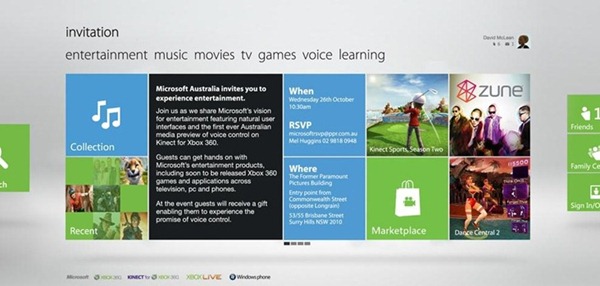
This is an awesome tech release of Microsoft. Voice search- voice command for search in bing. With the new Xbox Live dashboard update rolling out this week, It will be fun to make a video walk through to showcase some of the new features you'll be using. Bing voice search, "Beacons" for finding multiplayer friends, and the 511MB of cloud storage you can enable... which by the way, only seems to work with new save files and nothing that was saved prior to the update. And mean while we would like to include one thing that its not available on mobiles as of now.
7.Nokia Lumia 900 :

8.Sony’s Xperia S and Smart Watch:

Sony also showed off with its new release of Xperia S and also with its smart watches. The Sony XPERIA S was an eagerly awaited handset which offers a multitude of useful functions and features integrated into a stylish and appealing unit.It comes with Gingerbird android OS
9.Parrot AR Drone 2.0

10. MOTO ACTV:

Motrola was also active in CES . It had come with new Droid 4 which was just superb and also with a Moto ACTV. It will be your Personal Trainer and DJ. MOTOACTV is a cutting-edge fitness tracker and smart music player packed into a small, sweat proof and stylish device. It comes with GPS tracker. Tracks your cycling data, speed, calories burned and heart rate. You can monitor your performance in two ways, directly on your device and online at the MOTOACTV Training Portal. Some how we place it at 10th.
We tried our best to give you the top 10 gadgets showoff on CES 2012 function.
Incoming search Results:
- Top 10 gadgets of CES
- Top tech releases of CES
- Top tech releases of 2012
- USA releases
Read More
Add your Comment
0
comments
Factors That Determine Windows is genuine or not
This is a small trick which allows you to know whether Your OS is Genuine or Pirated 1!. Well There are many ways to check out.
Incoming search Results:
How to check whether Windows OS is genuine or not
1.If you need to check that your computer contains the genuine copy of windows 7 operating system then follows these steps
- Open control panel in windows 7
- navigate to the system and security
- now, click on the systems tab
- if your copy is genuine then you will see "Windows is activated"
- Also, you will find the windows genuine logo
By the above method you can check whether you have a genuine Windows 7 or not!.
 |
| genuine windows |
2. If you are able to do windows updates http://windowsupdate.microsoft.com/ then your OS is legit.
Hope this information will help you.
Incoming search Results:
How to check whether Windows is Genuine or Pirated
How to determine whether Windows is Genuine.
Read More
Add your Comment
0
comments
Aakash Tab Ubislate 7 A Big Flop??
Aakash tablet, the tablet which had made lot of buzz few days back. It was given the "World cheapest tablet". But now according to the users the tab seems to be a flop. Hope you all have heard about the cheapest Tablet of India. If not go through the Features of the world's Cheapest Aakash Tab.So lets come to the point. The tab is released all over India now. All the users have started using the Aakash tab. So we have received the reviews from users that Ubislate 7 has got many defects that annoy the user a lot. Here we are going to list few.
You may also like : Features and Specifications of Aakash tab 2 ublislate 7+
The main Defects the users are complaining about Ubislate 7 are:
- Very poor performance speed -As low processing power of 366MHz, which makes the Aakash tab to respond very slowly.
- Only Wifi connectivity-No GPRS or sim. Internet can be accessible only through Wi-fi. So we cannot access Internet all over.
- Can't even access Android market place from Aakash because of its low processing power :/
- Poor touch screen performance. : Poor touch screen makes Aakash tab even worser.
- Heating up faster : Aakash tab gets heated faster and so a big heating problem.
- Low Battery Life : Low battery backup annoys the user a lot. As it should be kept for charge regularly. And also When you go outside the Tab wont withstand for more hours.
 |
| low processing speed of aakash tab low processing speed of laptops aakash tab a flop |
You may also like : Features and Specifications of Aakash tab 2 ublislate 7+
Incoming Search Results:
- Main Defects of Ubislate 7.
- Aakash Tablet a big Flop.
- Aakash Tablet Sucks.
- Users Complaints about Aakash Tablet.
Read More
Add your Comment
0
comments
Social Plus Add-on [Facebook Dislike Button]
Hi readers . Thought posting on an Add-on of browsers which is very usefull.
Social plus is an add-on for browsers which gives you lots of new features for your social network sites.It gives you the most awaited Dislike Button and colors to facebook theme and gives you lots of skins.
You can view the above pic . this shows how the social plus plugin works.
It gives you different theme and also dislike button. You can see dislike button and also Flowers theme. It comes with 100's of themes.You can even change colors

Social plus is an add-on for browsers which gives you lots of new features for your social network sites.It gives you the most awaited Dislike Button and colors to facebook theme and gives you lots of skins.
Its just an awesome add-on everyone facebookian should have. See down for features with pics.
Features of new social plus add-on:
- Dislike button : As many are in need of dislike button. You dint like the post then you can dislike that post using the social plus add-on. It gives you dislike button to every facebook fan page as well as to every post of your friend.
- Facebook theme : Theme in the sense we are talking about skins. You can change your home page or your profile with different skins. There are 100's of skins available .
- Color : You dont like blue color of facebook??.. Then here is the social plus add-on . It gives you the access of coloring your profile to you. You can color the default blue screen to any desired color of your own.
 |
| dislike button |
You can view the above pic . this shows how the social plus plugin works.
It gives you different theme and also dislike button. You can see dislike button and also Flowers theme. It comes with 100's of themes.You can even change colors
You may also like this article : How to Get older facebook chat view
- Wizz and smileys : It comes with inbuilt smileys and also with "!WIZZ"
- Ease of surfing images : If you see thumbnails of your friend's pics . Earlier you need to click on the link to view the pic. Now social plus comes with special features. Just move the curser on the pic, you will get the full image and its time saving and easy to access .

You can download SOCIAL PLUS ADD ON to your chrome and Firefox here :
http://www.social-plus.net/en/download.php
Incoming search Results :
- Facebook Red color
- Facebook Different Colours
- Facebook Different Skins and Themes
- Social Plus Download
- Features of Social Plus Add-on
- Facebook Dislike Button
Read More
Add your Comment
0
comments
[How to] Delete the Recycle Bin Icon from the desktop in XP using Registry editor
Hi readers.. A friend of mine requested me to write a post on deleting the Recycle bin in windows XP. But the problem was I am having Windows 7 in my laptop. Anyways I managed to work out somehow and tried my best to post. SO HERE IT IS.
After navigating the above folder
The post isn't finisht yet :p
NOTE: there is a precautionary measure you need to take before editing the registry key. Before making any changes in registry folder just Make sure that you have very latest backup.
In cases where you're supposed to delete or modify keys or values from the registry it is possible to first export that key or value(s) to a .REG file before performing the changes.
For deleting the Recycle bin on your Desktop follow these steps:
- Open Registry Editor.
- In Registry Editor, Find the registry key which given below [highlighted in blue color] :
HKEY_LOCAL_MACHINE\SOFTWARE\Microsoft\Windows\CurrentVersion\Explorer\Desktop\ NameSpace
You may also like : How to create a folder with the name "con" [which many say impossible and also with valid reasons ]
After navigating the above folder
- FIND this code :
- {645FF040-5081-101B-9F08-00AA002F954E"}
 |
| deletion of recycle bin in XP |
- Delete the folder which is shown in the above screenshot. [the same key which is mentioned above]
- Close the registry folder.
You may also like : Features and specifications of the cheapest tablet and the world's 1st ICECREAM-SANDWICH tab
The post isn't finisht yet :p
NOTE: there is a precautionary measure you need to take before editing the registry key. Before making any changes in registry folder just Make sure that you have very latest backup.
In cases where you're supposed to delete or modify keys or values from the registry it is possible to first export that key or value(s) to a .REG file before performing the changes.
How to Restore the Recycle bin on the desktop
Just do the reverse of what we did above. I mean to say just create a folder with the same name. If you dint get it. I will explain below.
- As above navigate to the below register key
HKEY_LOCAL_MACHINE\SOFTWARE\Microsoft\Windows\CurrentVersion\Explorer\Desktop\ NameSpace
- Here comes the point. Create a folder with the name {645FF040-5081-101B-9F08-00AA002F954E"}
[Note: its the same code which we had deleted and the new folder's name should be with the parentheses .]
Thats it Done!!
And want to add one more thing this hold good for windows 7 also.
Thats it Done!!
And want to add one more thing this hold good for windows 7 also.
Read More
Add your Comment
0
comments
How to Make online money from internet surfing
Hi everybody. WISH YOU ALL A VERY HAPPY NEW YEAR. So on the day of new year I just thought of posting about how to make money online. I have seen many people, students who are in search of online money during holidays and also during free time. So just in the point of view of helping them I am writing this post.
CLICK HERE to join the clicksense


I have discussed only 2 methods, Will be adding many others soon.
And the point to be noted : The signup is absolutely free.
Incoming search :
There are many ways to earn money online. Here I am going to discuss only few.
1. Clicksense
This is a website which pays money for every click. Here in this website you need to view some adds place by the advertisers, which hardly takes few seconds. For every add you are paid 0.02$+ and there will be at least 20 adds a day. So here the task is just few seconds and you can earn money.CLICK HERE to join the clicksense
Click here to join the clicksense
I have personally using the above site to earn money. I have earned a bit from the above. You can trust the above company. Its a legit site. Hope you join this and start your earning.
You may also like this article : How to make upside down comment on facebook
2. BUX MATRIX
This is also a site which pays for the clicks on their adds and this website has another special feature. This pays for reading there email also. Weekly you will get some 50emails. You just need to open the email and then click a link for the credit and then your account will be credited to your bux matrix account and the payout is very much low.. You can earn money in a week.
Click here to join Bux matrix
And the point to be noted : The signup is absolutely free.
Incoming search :
Read More
Add your Comment
0
comments
Happy New year
WISH YOU ALL A VERY HAPPY NEW YEAR. Just thought of posting some cool awesome animations of newyear wishes.

HAPPY NEW YEAR ALL AGAIN.


HAPPY NEW YEAR ALL AGAIN.
Read More
Add your Comment
0
comments
[How to] Create a folder with the name CON
This post is about the windows hidden trick. There was a group chat in the facebook some1 was telling we cant create a folder with the name.So thought of posting on that.
Why cant we create a folder with the name "CON"
SO now how to create a folder with that name
The next time when someone asks the question why we can’t create a folder by name CON, say with confidence that it is not true and give the link of this blog ok .…
If you like this post share us on facebook.
Yeah we can create the folder with the name con and offcourse using a small trick
First let me come to the point why we cant create the file with that name
Why cant we create a folder with the name "CON"
DOS uses different names for the attached devices, I learnt. PRN was one such name. TYPE filename would display the contents of a file and TYPE filename > PRN would print it instead of displaying. Curiosity brings many hidden matters out. PRN would surely mean Printer and will redirect the output to the printer instead of console. Console (monitor) is the implicit default output device, and it can be bypassed if needed. So, how to put it explicitly? There must be some means to do that. Yes, there is! TYPE filename > CON performs exactly same function as TYPE filename. These special names for the devices really mean something special for the operating system and those names can not be used as folder or file names: CON, PRN, NUL, COM1 to COM9, LPT1 to LPT9, which stand for CONsole, PRiNter, NULl, serial COMmmunication ports, Line PrinTer ports.
You may also like article on : Install MAC OS ON PC Dual Boot with Windows 7
How to create a folder with the name " CON"
- Goto DOS
- Type MD \\.\C:\CON. The folder will be created. You can check it in Windows Explorer also, but you can’t access it
- To delete the folder, type RD \\.\C:\CON
- In short, use the network path syntax instead of absolute path syntax.
- Now on to the practical aspect of this. Why can’t we create it directly but using the network path syntax? The answer is simple. A computer can have only one default console, printer, null etc. So, if it is accessed from a network, theoretically, the console should belong to another node in the network. Since that node may not have a device which can be referred using the name CON, it will no longer be considered as a reserved name. Hence, the folder can be created.
The next time when someone asks the question why we can’t create a folder by name CON, say with confidence that it is not true and give the link of this blog ok .…
If you like this post share us on facebook.
Read More
Add your Comment
0
comments
Facebook clip arts
Hi Readers, Welcome to the blog . Hope you all liked my previous magic trick of Facebook.
Now i thought of posting some facebook clip arts these are really cool. I got a clip art from one of the group mate. A member of our group had posted the following art of newyear on the group. SO i just thought of sharing that with you all. so have a look and share this cool clipart with your friends on facebook
HERE is the new year coool clip art
▓▓░░▓▓░░░░▓▓░░░░▓▓▓▓▓░░░▓▓▓▓▓░░░▓▓░░▓▓ ▓▓░░▓▓░░░▓▓▓▓░░░▓▓░░▓▓░░▓▓░░▓▓░░▓▓░░▓▓ ▓▓▓▓▓▓░░▓▓░░▓▓░░▓▓▓▓▓░░░▓▓▓▓▓░░░░▓▓▓▓░ ▓▓░░▓▓░░▓▓▓▓▓▓░░▓▓░░░░░░▓▓░░░░░░░░▓▓░░ ▓▓░░▓▓░░▓▓░░▓▓░░▓▓░░░░░░▓▓░░░░░░░░▓▓░░
░░░░░░░░░░░░░░░░░░░░░░█████████ ░░███████░░░░░░░░░░███▒▒▒▒▒▒▒▒███ ░░█▒▒▒▒▒▒█░░░░░░░███▒▒▒▒▒▒▒▒▒▒▒▒▒███ ░░░█▒▒▒▒▒▒█░░░░██▒▒▒▒▒▒▒▒▒▒▒▒▒▒▒▒▒▒▒██ ░░░░█▒▒▒▒▒█░░░██▒▒▒▒▒██▒▒▒▒▒▒██▒▒▒▒▒███ ░░░░░█▒▒▒█░░░█▒▒▒▒▒▒████▒▒▒▒████▒▒▒▒▒▒██ ░░░█████████████▒▒▒▒▒▒▒▒▒▒▒▒▒▒▒▒▒▒▒▒▒▒██ ░░░█▒▒▒▒▒▒▒▒▒▒▒▒█▒▒▒▒▒▒▒▒▒█▒▒▒▒▒▒▒▒▒▒▒██ ░██▒▒▒▒▒▒▒▒▒▒▒▒▒█▒▒▒██▒▒▒▒▒▒▒▒▒▒██▒▒▒▒██ ██▒▒▒███████████▒▒▒▒▒██▒▒▒▒▒▒▒▒██▒▒▒▒▒██ █▒▒▒▒▒▒▒▒▒▒▒▒▒▒▒█▒▒▒▒▒▒████████▒▒▒▒▒▒▒██ ██▒▒▒▒▒▒▒▒▒▒▒▒▒▒█▒▒▒▒▒▒▒▒▒▒▒▒▒▒▒▒▒▒▒▒██ ░█▒▒▒███████████▒▒▒▒▒▒▒▒▒▒▒▒▒▒▒▒▒▒▒██ ░██▒▒▒▒▒▒▒▒▒▒████▒▒▒▒▒▒▒▒▒▒▒▒▒▒▒▒▒█ ░░████████████░░░█████████████████
▓▓░░░▓▓░▓▓▓▓▓▓░░▓▓░░░▓▓
▓▓▓▓░▓▓░▓▓░░░░░░▓▓░▓░▓▓
▓▓░▓▓▓▓░▓▓▓▓▓░░░▓▓░▓░▓▓
▓▓░░▓▓▓░▓▓░░░░░░▓▓░▓░▓▓
▓▓░░░▓▓░▓▓▓▓▓▓░░░▓▓░▓▓░
░▒███████
░██▓▒░░▒▓██
██▓▒░__░▒▓██___██████
██▓▒░____░▓███▓__░▒▓██
██▓▒░___░▓██▓_____░▒▓██
██▓▒░_______________░▒▓██
_██▓▒░______________░▒▓██
__██▓▒░____________░▒▓██
___██▓▒░__________░▒▓██
____██▓▒░________░▒▓██
_____██▓▒░_____░▒▓██
______██▓▒░__░▒▓██
_______█▓▒░░▒▓██
_________░▒▓██
_______░▒▓██
_____░▒▓██
..... •.¸.•´
...¸.•´
.. (
☻/
/▌♥♥♥♥♥♥♥♥♥♥♥♥♥♥♥♥♥♥♥♥♥
▓▓░░▓▓░░▓▓▓▓▓▓░░░░▓▓░░░░▓▓▓▓▓░ ▓▓░░▓▓░░▓▓░░░░░░░▓▓▓▓░░░▓▓░░▓▓ ░▓▓▓▓░░░▓▓▓▓▓░░░▓▓░░▓▓░░▓▓▓▓▓░ ░░▓▓░░░░▓▓░░░░░░▓▓▓▓▓▓░░▓▓░▓▓░ ░░▓▓░░░░▓▓▓▓▓▓░░▓▓░░▓▓░░▓▓░░▓▓
◕▄███▄◕──◕▄██▄◕──◕▄███◕──◕▄███▄◕
◕▀──██◕─◕██──██◕───◕██◕──◕▀──██◕
◕──██◕──◕██──██◕───◕██◕──◕──██◕
◕─██◕───◕██──██◕───◕██◕──◕─██◕
◕█████◕──◕▀██▀◕───◕▄██▄◕─◕█████◕
✿♥❀♥❁•*¨✿❀❁•*¨`*•.✿❀❁•*¨`*•.`✿♥❀♥❁♥❀♥❁
2.Another clip for 2012 .. copy paste and enjoy
╭━━━╮╭━━━╮┈┏┓╭━━━╮
┗━━╮┃┃╭━╮┃┏╯┃┗━━╮┃
╭━━╯┃┃┃┈┃┃┗┓┃╭━━╯┃
┃╭━━╯┃┃┈┃┃┈┃┃┃╭━━╯
┃┗━━┓┃╰━╯┃┈┃┃┃┗━━┓
┗━━━┛╰━━━╯┈┗┛┗━━━┛
2.Another clip for 2012 .. copy paste and enjoy
╭━━━╮╭━━━╮┈┏┓╭━━━╮
┗━━╮┃┃╭━╮┃┏╯┃┗━━╮┃
╭━━╯┃┃┃┈┃┃┗┓┃╭━━╯┃
┃╭━━╯┃┃┈┃┃┈┃┃┃╭━━╯
┃┗━━┓┃╰━╯┃┈┃┃┃┗━━┓
┗━━━┛╰━━━╯┈┗┛┗━━━┛
Read More
Add your Comment
0
comments
Facebook smileys [NEW YEAR TRICK]
Hi guys thought of posting about facebook smileys . Was just chatting in a group called tricks on facebook. A group member asked about smileys, so just thought of posting on dat.FACEBOOK is one of the biggest social networking site in this world. There are many but facebook is rocking ryt now. so let me come to the point about smileys. Smiley are necessary for showing our emotion and to make chat more effective...
[[124641767652266]] [[124642810985495]] [[124643044318805]] [[124643044318805]] [[124643487652094]] [[124642300985546]] [[124644090985367]] [[124644404318669]] [[124644567651986]] [[124642300985546]] [[124643487652094]] [[124644404318669]] [[124642810985495]] [[124645367651906]] [[124642300985546]] [[124645977651845]] [[124646247651818]] [[124646574318452]] [[124645977651845]] [[124642300985546]]

Guys enjoy this facebook trick. WISH YOU ALL A VERY NEW YEAR.. HAVE A BLAST.
You can also like this article : Features of the cheapest and the world's 1st ice cream-sandwich tab
Now let me post about all letters From A to Z . you can write anything you want like "how are you"
"wassup" "hows you" with the color and different font. Its like using wordart of MSWORD :p
Here comes the codes for all the alphabets.
this is an example
 code for wassup : [[125279704255139]] [[125022480947528]] [[125018587614584]] [[125018587614584]] [[125024057614037]] [[125279847588458]]
hope you all like this trick. please like us on facebook and also share your reviews by commenting.
And once again WISH YOU ALL A VERY HAPPY NEW YEAR
NEW YEAR WISH
Paste this code on facebook chat bar and then see the magic
[[124641767652266]] [[124642810985495]] [[124643044318805]] [[124643044318805]] [[124643487652094]] [[124642300985546]] [[124644090985367]] [[124644404318669]] [[124644567651986]] [[124642300985546]] [[124643487652094]] [[124644404318669]] [[124642810985495]] [[124645367651906]] [[124642300985546]] [[124645977651845]] [[124646247651818]] [[124646574318452]] [[124645977651845]] [[124642300985546]]
YOU will get something like this

Guys enjoy this facebook trick. WISH YOU ALL A VERY NEW YEAR.. HAVE A BLAST.
You can also like this article : Features of the cheapest and the world's 1st ice cream-sandwich tab
Now let me post about all letters From A to Z . you can write anything you want like "how are you""wassup" "hows you" with the color and different font. Its like using wordart of MSWORD :p
Here comes the codes for all the alphabets.
A = [[125022480947528]]B = [[125279727588470]] C = [[125021560947620]] D = [[125279830921793]] E = [[125279800921796]] F = [[125023244280785]] G = [[125017720948004]] H = [[125283894254720]] I = [[125020217614421]] J = [[125018334281276]] K = [[125020804281029]] L = [[125279927588450]] M = [[125279874255122]] N = [[125279857588457]] O = [[125022040947572]] P = [[125279847588458]] Q = [[125279784255131]] R = [[125279750921801]] S = [[125018587614584]] T = [[125021194280990]] U = [[125024057614037]] V = [[125279720921804]] W = [[125279704255139]] X = [[125279910921785]] Y = [[125279884255121]] Z = [[125287347587708]]
You can also like : Features that are to be considered while buying a laptop.
another example :
hope you all like this trick. please like us on facebook and also share your reviews by commenting.
And once again WISH YOU ALL A VERY HAPPY NEW YEAR
you may also like article: Save yourself from new Facebook spam [virus]
Read More
Add your Comment
0
comments
Facebook security trick
Hi guys my previous post was about disabling timeline of facebook. As facebook is a daily routine for many students and youth I thought of posting on another facebook security tip. This will help you when you browse facebook in any internet cafe.

Here is the procedure to get one time password ,
Before login, Take your mobile and SMS 'OTP' to 32665 or FBOOK
You will get a ONE TIME PASSWORD in your Inbox. Login to your account using that password.
Not your Regular password.
(This password will be Expired in 20 Mins.)
Note: First you have to Register your Mobile Number to FB account.
Share us on facebook and even like the post on facebook so that even your friends also will be safe
FB Security Tip:
While using FB in Public Shared Computers like Internet Cafe or Office.. use ONE TIME PASSWORD!
Here is the procedure to get one time password ,
Before login, Take your mobile and SMS 'OTP' to 32665 or FBOOK
You will get a ONE TIME PASSWORD in your Inbox. Login to your account using that password.
Not your Regular password.
(This password will be Expired in 20 Mins.)
Note: First you have to Register your Mobile Number to FB account.
Share us on facebook and even like the post on facebook so that even your friends also will be safe
Read More
Add your Comment
3
comments
[How to] Disable timeline feature of facebook
Hi everybody.. A friend of mine didnt like this facebook's new timeline feature even though its a awesome and best design ever done by facebook. Anyways different people have different taste. So here is a post about how to disable the time line feature. And this post I have not tried it personally . So I am not sure whether its gonna work o not. According to ma source it should work. So please do comment your reviews by posting comments. Its a browser dependent trick. You can just disable the timeline on your browser thats it, It will be the same timeline for your friends and public.
Step 1: Go to windows start button, do a search for Chrome and from the results right-click Google Chrome and select Properties.
Step 2: In the Target field, append the following at the end of the path that is already there (add a space between chrome.exe and the following line)
--user-agent="--user-agent="Mozilla/4.0 (compatible; MSIE 7.0; Windows NT 6.0)"
After you append the above line the Target field should look something like this:
C:\Users\your-username\AppData\Local\Google\Chrome\Application\chrome.exe
Mine : "C:\Users\Raviraj\AppData\Local\Google\Chrome\Application\chrome .exe"
--user-agent="Mozilla/4.0 (compatible; MSIE 7.0; Windows NT 6.0)"
Step 3: When you finish, click Apply and then click OK.
Step 4: Restart Google Chrome and log-in to your Facebook account and the old profile should be there.
NOTE: There is a chance that your Facebook profile may not display 100% correctly.
Step 2: If you don’t see the plugin’s icon in the navigation bar, right-click the navigation bar and select Customize.
Step 3: Look for the plugin button and drag & drop to the navigation bar.
Step 4: Now, just click the User Agent Switcher button and navigate through Internet Explorer and select Internet Explorer 7.
Step 5: Finally go to Facebook.com and log-in to your profile and you should be seeing your old profile.
Important: Don’t forget to get back to defaults once you are done using Facebook by click the User Agent Switcher button and choosing Default User Agent to avoid other websites from displaying incorrectly.
Hope this helped you out. Comments are welcomed and please like our facebook fan page.
Incoming Searches:
How to disable Facebook Timeline on Google Chrome:
Step 1: Go to windows start button, do a search for Chrome and from the results right-click Google Chrome and select Properties.
Step 2: In the Target field, append the following at the end of the path that is already there (add a space between chrome.exe and the following line)
--user-agent="--user-agent="Mozilla/4.0 (compatible; MSIE 7.0; Windows NT 6.0)"
After you append the above line the Target field should look something like this:
C:\Users\your-username\AppData\Local\Google\Chrome\Application\chrome.exe
Mine : "C:\Users\Raviraj\AppData\Local\Google\Chrome\Application\chrome .exe"
--user-agent="Mozilla/4.0 (compatible; MSIE 7.0; Windows NT 6.0)"
Step 3: When you finish, click Apply and then click OK.
Step 4: Restart Google Chrome and log-in to your Facebook account and the old profile should be there.
NOTE: There is a chance that your Facebook profile may not display 100% correctly.
How to disable Facebook timeline on Firefox Trick:
Step 1: While in Firefox add-ons. In the search box on the top-right corner do a search for “User Agent Switcher”, when you see it, click Install and then restart Firefox to complete the installation.Step 2: If you don’t see the plugin’s icon in the navigation bar, right-click the navigation bar and select Customize.
Step 3: Look for the plugin button and drag & drop to the navigation bar.
Step 4: Now, just click the User Agent Switcher button and navigate through Internet Explorer and select Internet Explorer 7.
Step 5: Finally go to Facebook.com and log-in to your profile and you should be seeing your old profile.
Important: Don’t forget to get back to defaults once you are done using Facebook by click the User Agent Switcher button and choosing Default User Agent to avoid other websites from displaying incorrectly.
Hope this helped you out. Comments are welcomed and please like our facebook fan page.
Incoming Searches:
Read More
Add your Comment
0
comments
Features and Specifications of Ainovo NOVO7 Tablet
Hi everybody.. A friend of mine just told about the Ainovo NOVO7 so thought of posting about the features of about a tablet which has awesome features. My last post was about Features and defects of aakash tab, a cheapest tab in the world by India which costs only 30$.
 1.The First Ice-cream Sandwich tab:
NOV07, the world's first Ice Cream Sandwich tab, gives you the latest android version.
2.Power efficient GPU and CPU:
It comes with the new XBurst chip, which is poweer-efficient which makes quick and responsive and also good battery life.
3.Support:
Over 200.000 Android apps are available .
Novo 7 offers full access to the apps, musics available on the android market.
4.Dual Camera:
It comes with two cameras, front and the rear, which gives the availability of video calling.
5.1080 HDMI TV output:
This comes with the 1080 HDMI output so that you can experience the cinematic videos anywhere.
6.Wifi/3G networking
Built-in wifi modules, also supports external 3G, you can always online :p

This is a Fast, efficient and outstanding Chip
It combines with the power of 1GHz XBurst CPU(as mentioned above)
along with a 1080P VPU and GPU.
The Xburst's applies an innocative micro-structure which dellivers impressiveely low power consumption
30%faster calculation speed
100% better multi-media function
70% less power consumption
Now coming to price and availability
Right now Ainovo NOV07 is available at 100$ in china.
The tablet is marketing in China under the Ainol Electronics brand and it is expected that tablet will reach other countries like USA and India in coming months, with little increase in price . But in INDIA it would cost round about 150$ inclusive of shiping prices.
Hope this helped you out .
INCOMING SEARCHES:
2day its time to post about another tab, but right now its available only in CHINA
Ainovo NOVO7 is a new tablet from MIPS, China which features Android 4.0 Ice Cream Sandwich OS and having a price below $100.
Features and specifications are provided here.
Ainovo NOVO7 is a new tablet from MIPS, China which features Android 4.0 Ice Cream Sandwich OS and having a price below $100.
Features and specifications are provided here.
 |
| ainovo tab of computer tricks site |
Features and Specifications
 1.The First Ice-cream Sandwich tab:
NOV07, the world's first Ice Cream Sandwich tab, gives you the latest android version.
2.Power efficient GPU and CPU:
It comes with the new XBurst chip, which is poweer-efficient which makes quick and responsive and also good battery life.
3.Support:
Over 200.000 Android apps are available .
Novo 7 offers full access to the apps, musics available on the android market.
4.Dual Camera:
It comes with two cameras, front and the rear, which gives the availability of video calling.
5.1080 HDMI TV output:
This comes with the 1080 HDMI output so that you can experience the cinematic videos anywhere.
6.Wifi/3G networking
Built-in wifi modules, also supports external 3G, you can always online :p
Ingenic JS4770 1GHz Chip

This is a Fast, efficient and outstanding Chip
It combines with the power of 1GHz XBurst CPU(as mentioned above)
along with a 1080P VPU and GPU.
The Xburst's applies an innocative micro-structure which dellivers impressiveely low power consumption
30%faster calculation speed
100% better multi-media function
70% less power consumption
Now coming to price and availability
Right now Ainovo NOV07 is available at 100$ in china.
The tablet is marketing in China under the Ainol Electronics brand and it is expected that tablet will reach other countries like USA and India in coming months, with little increase in price . But in INDIA it would cost round about 150$ inclusive of shiping prices.
Hope this helped you out .
INCOMING SEARCHES:
Read More
Add your Comment
1 comments
Turbo C++ for Windows 7/Vista In FullScreen 64 bit - All DOS Programs & Games Supported - Dosbox
Even though Turbo C was required for me during this semester studies. I didnt use this Turboc instead I was using Visual studio 2010 for programming . Even though Visual studio is better than turboc, still many like turboc because of simplicity.
So in this post just thought of saying about installing Turboc in windows 7 in full screen 64 bit machine.
Follow these STEPS
1) Create a directory and name it "DOSFOLDER" preferably in the root/c: or any other. This folder will be mounted as C: in DOSBox, you will learn later in this post.
So in this post just thought of saying about installing Turboc in windows 7 in full screen 64 bit machine.
Follow these STEPS
1) Create a directory and name it "DOSFOLDER" preferably in the root/c: or any other. This folder will be mounted as C: in DOSBox, you will learn later in this post.
2) Copy all DOS applications & games (eg dev) to this directory. For example if you want to run Turbo C++ IDE, copy TC folder or extract from TC installer to this directory.
3) Download & Install the DOSBox for Windows 7/Vista & MacOS from the link provided at the end of the post.
4) Run DOSBox, go to start> all programs/programs> DOSBox0.74(or similar)> DOSBox
or from the desktop. The DOS Emulator will open. On the title bar you can see the clock speed.
5) You are prompt to Z:\>
You need to mount the folder you had created in step 1, if you skipped it, do it now. Here you will store all dos programs & games.
6) I am considering the path to folder/directory "DOSFOLDER" you recently created is C:\DOSFOLDER (for simplicity root directory was used)
write the following lines of codes in dos emulator:
Z:\> mount c c:\DOSFOLDER
you would get a message Drive C is mounted as local directory C:\DOSFOLDER. You can use any drive letter instead of C eg H, I, J etc. Which is actually the virtual drive you have created in DOS emulator DOSBox. now type:
C:
C:\>
If you remember or used DOS previously it's simple dos command. For example if you have saved all the files & folders of Turbo C++ IDE ie folder "TC" inside folder "DOSFOLDER" then type
C:\> CD TC/BIN
C:\TC\BIN>TC
The TC.exe file is located in Bin directory of TC. In the same way you can locate the other dos programs and games. If you don't remember the names then us dir command to list the files inside any directory. The above line will open Turbo C++ IDE.
Configure DOSBox to Auto Mount & Auto Execute
1) If you want to save some time from typing these codes every time you start DOSBox.
Go to "C:\Program Files\DOSBox-0.74" where DOSBox is installed using windows explorer.
2) Now run a batch file "DOSBox 0.74 Options.bat" which is present in the folder. A "dosbox-0.74.conf" file will open in notepad. Scroll to bottom, you will find [autoexec].
Just below [autoexec] write the following lines of commands
mount c c:\DOSFOLDER
C:
And save the file. The above code will be automatically executed when you start DosBox. It will mount the folder DOSFOLDER and create a virtual drive. Now you can type the name of programs to run.
3) If you want to use only one program eg Turbo C/C++ IDE or DEV ..
Then after [autoexec] write the following lines of commands
mount C C:\DOSFOLDER
C:
CD TC/BIN
TC
Above code will directly open Turbo C/C++ when you run dosbox.
OFFCIAL WEBSITE OF DOSBOX - www.dosbox.com
Read More
Add your Comment
0
comments
Features to be considered before buying a laptop
Hi everybody .. i just had my sem exams. Thought of posting something about laptops and what are the factors that are to be taken care while buying a laptop. This article is bounded only on the point of view of laptops. A laptop is different from a desktop computer. It has different features and functions. Let me come to the point .
There are few things that are to be taken care while taking a laptop.
There are few things that are to be taken care while taking a laptop.
1. Weight and Size
Weight : The lighter the laptop, the easier it is to move around. Prices usually have an inverse relationship with the weight of a laptop.
On the other end the features of a laptop which would affect the weight of the laptop, which can be if it has a powerful graphics card, or a larger screen etc. The laptop will end up being comparatively heavier and more expensive. So keep a look out for that.
So the point is, i> If you are taking laptop outside the home often then go for the lighter and if the laptop will be in home all the time then you can compromise with the features of laptop[bulkier].
This was all about its size
Size: The most common screen size of laptop is 14.4.. Again here, the small screens will be a boon for travelers. And for home users a bigger screens of 15.5 or 17" .
2.INUT DEVICES
In laptops there wont be a hand-driven mouse instead we will be having a touch pad[track pad] or a pointing stick. So now if you were having a desktop before you need to cope with touchpad!
Hard-core gaming with these devices might be a little problematic.
4. DISPLAY:
There are many things you need to take into account while buying a laptop.
Whether it is LCD?
Whether it is LED?
Whether it is capable of HD?
LCD: Liquid Crystal Display.. this is which is use in general.
LED: Light Emitting Diode.. this gives better quality of image..it consumes less power as compared to LCD
HD: High defination.. should take care whether it is capable of HD o not [if HD quality is required :p].
And now a days there are talks of 3D also.
And at last the most important thing to be noted.
Your Compatibility: If possible, “test-drive” a laptop before purchasing it. A laptop is different from a computer. In a computer if you don’t like your mouse or cd-rom drive you can replace it. In a laptop that is not possible. Once you buy it, you either keep the complete piece or you throw away the complete piece. (Please don’t throw it away. Give it to me! :p) It is hard to replace an annoying keyboard, an irritating touch pad device, or a poor display. So make sure that you're okay with your laptop by playing around with it.
And i am finally ending my post on features of laptop that are to be taken care. But this post was only bounded to laptops.. Here nothing is discussed about OS, Performance speed , RAM, Hard Disk, Graphics etc etc.. About all these I will be writing in another post.. WAIT FOR IT :p . Thank you hope this gave you some idea about buying a laptop.
COMMENTS ARE WELCOMED.
On the other end the features of a laptop which would affect the weight of the laptop, which can be if it has a powerful graphics card, or a larger screen etc. The laptop will end up being comparatively heavier and more expensive. So keep a look out for that.
So the point is, i> If you are taking laptop outside the home often then go for the lighter and if the laptop will be in home all the time then you can compromise with the features of laptop[bulkier].
This was all about its size
Size: The most common screen size of laptop is 14.4.. Again here, the small screens will be a boon for travelers. And for home users a bigger screens of 15.5 or 17" .
 |
| awesome laptop laptop selection how to select a laptop |
2.INUT DEVICES
In laptops there wont be a hand-driven mouse instead we will be having a touch pad[track pad] or a pointing stick. So now if you were having a desktop before you need to cope with touchpad!Hard-core gaming with these devices might be a little problematic.
3.BATTERIES
Batteries of laptop are nothing but the built-in UPS. Battery backup is the biggest boon of laptop. Because of battery backup only the laptop has become so famous.The main feature you need to look in buying a laptop is its battery back up. How many hours the laptop works without power this is the point to be noted.4. DISPLAY:
There are many things you need to take into account while buying a laptop.Whether it is LCD?
Whether it is LED?
Whether it is capable of HD?
LCD: Liquid Crystal Display.. this is which is use in general.
LED: Light Emitting Diode.. this gives better quality of image..it consumes less power as compared to LCD
HD: High defination.. should take care whether it is capable of HD o not [if HD quality is required :p].
And now a days there are talks of 3D also.
4.Keyboard
All laptops have cramped keyboards, but at least try to find a laptop with a keyboard with which you can comfortably type. Also, consider getting a spill-resistant keyboard if you have kids or work in a “spill” type environment.And at last the most important thing to be noted.
Your Compatibility: If possible, “test-drive” a laptop before purchasing it. A laptop is different from a computer. In a computer if you don’t like your mouse or cd-rom drive you can replace it. In a laptop that is not possible. Once you buy it, you either keep the complete piece or you throw away the complete piece. (Please don’t throw it away. Give it to me! :p) It is hard to replace an annoying keyboard, an irritating touch pad device, or a poor display. So make sure that you're okay with your laptop by playing around with it.
And i am finally ending my post on features of laptop that are to be taken care. But this post was only bounded to laptops.. Here nothing is discussed about OS, Performance speed , RAM, Hard Disk, Graphics etc etc.. About all these I will be writing in another post.. WAIT FOR IT :p . Thank you hope this gave you some idea about buying a laptop.
COMMENTS ARE WELCOMED.
Read More
Add your Comment
0
comments
[How to] Get rid of new Facebook Scam, Extensions
Hi everybody... thought of posting something related to a new scam of facebook.

I was just surfing net got a notification that a friend of mine posted on ma wall..So just opened my wall n saw. Had a post something like "You cant watch more than 15secs . You dare to watch it ". As i knew it was a scam before I did'nt take the risk of opening that instead i reported it as spam....and yeah my friend had become a victim of this scam.
It is actually not his fault, it may be due to malicious Facebook application(worm) to which he might had given
permission to access his account. By just seeing this I had taken a screenshot of it :p .
Now let us see how exactly it looks like ??
 |
| facebook spam |
This is how it exactly looks.
HOW IT GETS INSTALLED IN YOUR BROWSER
When you click on the link posted by your friend on your wall like the above snap, you will be taken to a site, which looks alike as Facebook, and there it will ask you to install DivX plugin to watch the video,
if you install that plugin, then you finally got scammed by some1 you get this “youtube.crx” extension installed in your Chrome,Firefox any browser
HOW TO GET RID OF THIS
Everything has a solution dont worry :p . Just remove that extension from your browser and prevent yourself from such scams
The extension looks like

Just click on remove and thats it done.
For the sake of simplicity let me tell how to remove extensions in couple of browsers.
HOW TO UNINSTALL EXTENSIONS
FOR CHROME:
Uninstall an extension to remove it completely from the browser:
Click the wrench icon on the browser toolbar.
Click Tools.
Select Extensions.
Click Uninstall for the extension you'd like to completely remove.
You can also temporarily turn off an extension by disabling it on the Extensions page.

FOR FIREFOX:
Click "Tools -> Add-ons (Add-on Manager in SeaMonkey 2
Click on the Extensions or Themes button on the top.
Click on the extension or theme you want to uninstall.
Click Uninstall.
Restart your Mozilla application.
HOPE THIS POST HELPED YOU ALL . If you find helpfull share us on facebook. Thankyou
And please stop posting hackers are on facebook and they are posting porns and all.. Its not hacked. hacked means you wont have access of your account . But you are accessing your account correctly. SO its not hacking. they are just scamming around. Dont give them the fame of hacker :p for free :p.
Incoming Searches:
- How to get rid of facebook spam.
- How to stop the facebook spam.
- How faceboook is working.
Read More
Add your Comment
0
comments
Features and Defects of the cheapest TABLET AAKASH
As Every one is Excited to know about the awated Aakash Tablet by indian government. it is the world’s cheapest tab and hence everyone is thinking about to purchase this. But lets Know about the inside story of this tab.
I am Not saying that this TAB is a defected piece but i just want to inform you all about the problems that you might face after purchasing this.
Features and Specifications of Aakash Tablet
- Display - Aakash Tablet has a 7 inch resistive touch screen with 800 x 480 pixel resolution.
- Operating System- Akash Tab runs Android 2.2 (Froyo).
- Processor- It has got a single core 366 MHz processor plus a HD video co-processor, 256 MB RAM and 2GB internal flash memory.
- Supported Multimedia Formats- Aakash Tablet supports Image formats like .png, .jpg, .gif, .bmp. Supported Video Formats include MPEG2, MPEG4, AVI and FLV. The Tablet also supports audio formats such as MP3, AAC, AC3, WAV and WMA.
- External Connectors- Aakash Tablet supports Mini and Full USB, has got two SD card slots (memory expandable up-to 32GB), a SIM card slot, Video Out, a 3.5 mm headphone jack support and HDMI port.
- Internet Connectivity- Aakash is a Wi-Fi 802.11 a/b/g enabled Tablet with a Web Browser having Standards Compliance, xHTML 1.1 compliant, JavaScript 1.8 compliant and safety compliance. It also offers separate software for online YouTube videos.
- App Store- Akash Tab supports more than 150000 apps to keep you entertained throughout the day.

NOW let me come to the defects of the tab.
Some major Defects and issues with this popular Akash laptop have been listed Here
-Slow Processing Speed can make you irritate while working with it.
-Low memory, You Will be unable to store a collection of your data.
-Low Battery back-up issue-The Most Important thing which must be considered.
-Poor Quality of touch Screen.
-Support.
Anyways if you are comfortable with this then go for it. I even heard that they are trying to improve its latest versions as first 1lakh had some defects.Only point is you are getting a tab for very cheap price.
ENJOY. please give your reviews by commenting!!
Incoming Searches:
Major Disadvantages of Aakash Tab
Akash tab a big flop
Defects of Aakash tab Ubislate 7
Read More
Add your Comment
1 comments
NOKIA's 100 CODES
Here is NOKIA's 100 secret codes :-
Dial using the keypad: * # 0000 # – the version number displayed on the display.
IMEI
Dial using the keypad: * # 06 # – IMEI number is displayed on the display.
SimClock
Allows you to check whether your SIM-card mode StopClock. When transferring the card to this mode significantly reduces power consumption and thus increases the work of the battery. Generally, all modern
SIM-cards support this mode.
*#7780# reset to factory settings.
*#67705646# This will clear the LCD display (operator logo).
*#0000# To view software version.
*#2820# Blue tooth device address.
*#746025625# Sim clock allowed status.
*#62209526# – Display the MAC address of the WLAN adapter. This is available only in the newer devices that support WLAN
#pw+1234567890+1# Shows if sim have restrictions.
*#92702689# – takes you to a secret menu where you may find some of the information below:
1. Displays Serial Number.
2. Displays the Month and Year of Manufacture
3. Displays (if there) the date where the phone was purchased (MMYY)
4. Displays the date of the last repair – if found (0000)
5. Shows life timer of phone (time passes since last start)
*#3370# – Enhanced Full Rate Codec (EFR) activation. Increase signal strength, better signal reception. It also help if u want to use GPRS and the service is not responding or too slow. Phone battery will drain faster though.
*#3370* – (EFR) deactivation. Phone will automatically restart. Increase battery life by 30% because phone receives less signal from network.
*#4720# - Half Rate Code activation.
*#4720* – Half Rate Code deactivation. The phone will automatically restart
If you forgot wallet code for Nokia S60 phone, use this code reset: *#7370925538#
Note, your data in the wallet will be erased. Phone will ask you the lock code. Default lock code is: 12345
Press *#3925538# to delete the contents and code of wallet.
Unlock service provider: Insert sim, turn phone on and press vol up(arrow keys) for 3 seconds, should say pin code. Press C,then press * message should flash, press * again and 04*pin*pin*pin#
*#7328748263373738# resets security code.
Default security code is 12345
SIM Clock
Stop allowed
Warranty Codes
* # 92702689 # [* # war0anty #]
Enter the menu of warranty codes. In fact, you do not need, but you can find them using the arrows scroll menu.
Menu:
Shows the serial number of the device.
Date and year of manufacture (eg 0299).
Shows month and year of sale (if installed). Here you can set the date, but be careful – it can be done only once in their life phone
Date of last repair (if any)
Sends all the phone numbers, pictures, and calls from one phone to another (possibly in order to restore). In models with an infrared eye, this procedure works, and through him
EFR CODEC (Enhanced Full Rate)
This function with its inclusion on the idea, should significantly improve the quality of speech, but unfortunately, it must be supported by your connection. When the work is slightly increased power in the phone call (about 5%). How do I know, none of the Russian cellular operators do not support this feature. Principle is based on a different compression algorithm for speech recognition (ACELP) and has a wider bandwidth.
Dial * 3370 # to activate (the phone should reboot) or # 3370 # to deactivate this function.
HR CODEC (Half Rate)
Substantially impairs the quality of speech, but saves battery somewhere at 30%. Again, must be supported by a mobile operator. American networks that support this feature, I do not know.
Dial * 4720 # to activate (the phone should reboot)
or # 4720 # to deactivate this function.
“The secret” button “Power” (61hh, 7110)
If you briefly press the button of your phone, you get to the “quick change” profiles (custom settings). Very handy feature, which personally I often use. Her “documented” in the model 7110.
“The Secret” 54 #
If you are using a SIM-card memory for storing notebook, then knowing the exact address of the phone number in the memory (number of cells in the SIM-card) is the ability to quickly extract the necessary number to the clipboard dialing apparatus. Simply dial the cell (eg, 6) and press # (bars). The number immediately appears on your screen.
Error in the microcode (61hh)
This error does not lead to any serious consequences, and with normal use of the phone “on purpose” will not happen ever. Here is a sequence of actions in which it manifests itself – the phone just reloaded.
Log in Calendar (Menu-8)
Make a note or reminder
Enter some text in the editing window
Press and hold the Clear button until the text is empty, then click Back.
You will return to main screen, but will appear on the screen space (which you certainly do not see).
Enter any 4 digits (eg 1234).
Using the arrow keys, move the cursor to the beginning of this line with the numbers (click the down arrow 2 times).
Now enter any additional 6 digits and press Send (green tube).
Wait a few seconds. Phone flashes illuminated keys and display, and finally reboot.
Answers to some of the other questions you can get by reading Nokia61xx FAQ by 2Pac.
Network Monitor (61xx)
This – the hidden menu in your Nokia phone. If you want to activate this menu, you must use a program that pereprogramiruet some chips in your phone.
For example monitor the network in Nokia 6110:
Check the version of your software. You can continue ONLY if you have 4.33, 4.73 or 5.24!
2. Dismantle EEprom.
3. Choose the program EEProm (ATMEL In 24C64).
4. Read data from EEProm and save in the backup.
5. If you have v4.33, then 4.73, or change address 03B8 from 00 to FF.
6. If you have a v5-24, then changed 0378 to 00 in FF.
7. Write the new data in EEProm, and knitted his back to the portable phone.
8. Turn on your phone and you will have a new menu 10.
Network Monitor gives you the following information:
Number (number) Courier (transportation)
The level of sex workers in dBM
The received signal quality C1 (the criterion of loss of track is used to select the cells and re). Range – 99 to 99
RLT (Break Radio Communication)
The loss of time information on network
TMSI (Temporary Mobile Subscriber Identity)
Identification of Cells (cell ID, the number (number) of the cell)
MCC (Mobile Country Code)
MNC (Mobile Network Code)
LAC (Location Area Code)
Ciphering (vklvykl)
Hopping (vklvykl)
DTX (vklvykl)
Your business card on the display:
Edit menu (Menu 2-7-2-1) to your provider for that – something that you want (3 characters maximum)
Install the unit cost of the phone (Menu 2-7-2-1) to 1
Sign in to limit the cost (Menu 2-7-1-1) like your phone number
Change a profile (3 -...- Menu 3) to its name
How to get new tones calls:
Set SMSC (phone number) 358405202999
Send an SMS with the word: TONES
Send it to number 99999
When you receive a reply (this will improve in the language) you will list of ringing tones.
By selecting one, send it to the same number.
After a while you get the tone.
You can edit a melody, and then bring it to your phone!
New ringtone received. If it works, he should write to New ringtone received.
Scan, enhance, or remove restrictions on the map
Enter * pw +1234567890 +1 – Provider-Lock status
Press (printing) * pw +1234567890 +2 – Network-Lock status
Press (printing) * pw +1234567890 +3 – Provider (???)- Lock status
Press (printing) * pw +1234567890 +4 – SimCard-Lock status
1234567890 (master code) – 10 nine-code zaviseschy by IMEI
Disclosure of the hidden menu nokia 6110
There are two menus for nokia 6100 series, which is not allowed in the normal mode, and only appears when some accessories fitted, namely hands-free kit or car kit.
Please note: Follow the instructions that follow you can deny the guarantee, for which I bear no responsibility.
If you look at the bottom start your phone, you will see 7 contacts.
The inclusion of hands-free menu
If you zakorotite 1 and 2, the contact shall appear the word 'Headset'. Now you can use the menu 3-6.
Including road menu.
Zakorotite contacts 2 and 3 for a few seconds and you should see the word 'Car'.
Now you can use the menu 3-7.
Removing Menu
The only way to remove the menu is to choose, choose restoration of factory settings. When asked, enter your security code (by default – 12345). Doing so will rid of the menu, but also received poudalyaet the melody.

A police radar gun. (NOKIA 5110/6110/6150/8850)
In order to detect police radar, do the following steps:
” Options –
” Secret settings – ”
” Group –
Activate and enter the code 00000 then press DC
Now you have to display a new ekonka this means is that if a radius of 1 km. Radar will phone you about this report pikanem (as SMS)
This does not work in some countries!
In some phones you may want to remove SP-Lock, directly through the phone menu!
1. Insert the card of another operator.
2. Turn on your phone and hold the button increases the volume of more than 3 seconds. And then release your telephone asks PIN code?
3. Click the “C”
4. Then press the button as far as times * and 04 * PIN * PIN * PIN #
Phone write PIN-code conversion.
Now, turn off and turn on the phone again. He priymet card!
Hope you enjoyed all the codes of Nokia ... pls share if you like us ..
Dial using the keypad: * # 0000 # – the version number displayed on the display.
 |
| nokia logo |
IMEI
Dial using the keypad: * # 06 # – IMEI number is displayed on the display.
SimClock
Allows you to check whether your SIM-card mode StopClock. When transferring the card to this mode significantly reduces power consumption and thus increases the work of the battery. Generally, all modern
SIM-cards support this mode.
*#7780# reset to factory settings.
*#67705646# This will clear the LCD display (operator logo).
*#0000# To view software version.
*#2820# Blue tooth device address.
*#746025625# Sim clock allowed status.
*#62209526# – Display the MAC address of the WLAN adapter. This is available only in the newer devices that support WLAN
#pw+1234567890+1# Shows if sim have restrictions.
*#92702689# – takes you to a secret menu where you may find some of the information below:
1. Displays Serial Number.
2. Displays the Month and Year of Manufacture
3. Displays (if there) the date where the phone was purchased (MMYY)
4. Displays the date of the last repair – if found (0000)
5. Shows life timer of phone (time passes since last start)
*#3370# – Enhanced Full Rate Codec (EFR) activation. Increase signal strength, better signal reception. It also help if u want to use GPRS and the service is not responding or too slow. Phone battery will drain faster though.
*#3370* – (EFR) deactivation. Phone will automatically restart. Increase battery life by 30% because phone receives less signal from network.
*#4720# - Half Rate Code activation.
*#4720* – Half Rate Code deactivation. The phone will automatically restart
If you forgot wallet code for Nokia S60 phone, use this code reset: *#7370925538#
Note, your data in the wallet will be erased. Phone will ask you the lock code. Default lock code is: 12345
Press *#3925538# to delete the contents and code of wallet.
Unlock service provider: Insert sim, turn phone on and press vol up(arrow keys) for 3 seconds, should say pin code. Press C,then press * message should flash, press * again and 04*pin*pin*pin#
*#7328748263373738# resets security code.
Default security code is 12345
SIM Clock
Stop allowed
Warranty Codes
* # 92702689 # [* # war0anty #]
Enter the menu of warranty codes. In fact, you do not need, but you can find them using the arrows scroll menu.
Menu:
Shows the serial number of the device.
Date and year of manufacture (eg 0299).
Shows month and year of sale (if installed). Here you can set the date, but be careful – it can be done only once in their life phone
Date of last repair (if any)
Sends all the phone numbers, pictures, and calls from one phone to another (possibly in order to restore). In models with an infrared eye, this procedure works, and through him
EFR CODEC (Enhanced Full Rate)
This function with its inclusion on the idea, should significantly improve the quality of speech, but unfortunately, it must be supported by your connection. When the work is slightly increased power in the phone call (about 5%). How do I know, none of the Russian cellular operators do not support this feature. Principle is based on a different compression algorithm for speech recognition (ACELP) and has a wider bandwidth.
Dial * 3370 # to activate (the phone should reboot) or # 3370 # to deactivate this function.
HR CODEC (Half Rate)
Substantially impairs the quality of speech, but saves battery somewhere at 30%. Again, must be supported by a mobile operator. American networks that support this feature, I do not know.
Dial * 4720 # to activate (the phone should reboot)
or # 4720 # to deactivate this function.
“The secret” button “Power” (61hh, 7110)
If you briefly press the button of your phone, you get to the “quick change” profiles (custom settings). Very handy feature, which personally I often use. Her “documented” in the model 7110.
“The Secret” 54 #
If you are using a SIM-card memory for storing notebook, then knowing the exact address of the phone number in the memory (number of cells in the SIM-card) is the ability to quickly extract the necessary number to the clipboard dialing apparatus. Simply dial the cell (eg, 6) and press # (bars). The number immediately appears on your screen.
Error in the microcode (61hh)
This error does not lead to any serious consequences, and with normal use of the phone “on purpose” will not happen ever. Here is a sequence of actions in which it manifests itself – the phone just reloaded.
Log in Calendar (Menu-8)
Make a note or reminder
Enter some text in the editing window
Press and hold the Clear button until the text is empty, then click Back.
You will return to main screen, but will appear on the screen space (which you certainly do not see).
Enter any 4 digits (eg 1234).
Using the arrow keys, move the cursor to the beginning of this line with the numbers (click the down arrow 2 times).
Now enter any additional 6 digits and press Send (green tube).
Wait a few seconds. Phone flashes illuminated keys and display, and finally reboot.
Answers to some of the other questions you can get by reading Nokia61xx FAQ by 2Pac.
Network Monitor (61xx)
This – the hidden menu in your Nokia phone. If you want to activate this menu, you must use a program that pereprogramiruet some chips in your phone.
For example monitor the network in Nokia 6110:
Check the version of your software. You can continue ONLY if you have 4.33, 4.73 or 5.24!
2. Dismantle EEprom.
3. Choose the program EEProm (ATMEL In 24C64).
4. Read data from EEProm and save in the backup.
5. If you have v4.33, then 4.73, or change address 03B8 from 00 to FF.
6. If you have a v5-24, then changed 0378 to 00 in FF.
7. Write the new data in EEProm, and knitted his back to the portable phone.
8. Turn on your phone and you will have a new menu 10.
Network Monitor gives you the following information:
Number (number) Courier (transportation)
The level of sex workers in dBM
The received signal quality C1 (the criterion of loss of track is used to select the cells and re). Range – 99 to 99
RLT (Break Radio Communication)
The loss of time information on network
TMSI (Temporary Mobile Subscriber Identity)
Identification of Cells (cell ID, the number (number) of the cell)
MCC (Mobile Country Code)
MNC (Mobile Network Code)
LAC (Location Area Code)
Ciphering (vklvykl)
Hopping (vklvykl)
DTX (vklvykl)
Your business card on the display:
Edit menu (Menu 2-7-2-1) to your provider for that – something that you want (3 characters maximum)
Install the unit cost of the phone (Menu 2-7-2-1) to 1
Sign in to limit the cost (Menu 2-7-1-1) like your phone number
Change a profile (3 -...- Menu 3) to its name
How to get new tones calls:
Set SMSC (phone number) 358405202999
Send an SMS with the word: TONES
Send it to number 99999
When you receive a reply (this will improve in the language) you will list of ringing tones.
By selecting one, send it to the same number.
After a while you get the tone.
You can edit a melody, and then bring it to your phone!
New ringtone received. If it works, he should write to New ringtone received.
Scan, enhance, or remove restrictions on the map
Enter * pw +1234567890 +1 – Provider-Lock status
Press (printing) * pw +1234567890 +2 – Network-Lock status
Press (printing) * pw +1234567890 +3 – Provider (???)- Lock status
Press (printing) * pw +1234567890 +4 – SimCard-Lock status
1234567890 (master code) – 10 nine-code zaviseschy by IMEI
Disclosure of the hidden menu nokia 6110
There are two menus for nokia 6100 series, which is not allowed in the normal mode, and only appears when some accessories fitted, namely hands-free kit or car kit.
Please note: Follow the instructions that follow you can deny the guarantee, for which I bear no responsibility.
If you look at the bottom start your phone, you will see 7 contacts.
The inclusion of hands-free menu
If you zakorotite 1 and 2, the contact shall appear the word 'Headset'. Now you can use the menu 3-6.
Including road menu.
Zakorotite contacts 2 and 3 for a few seconds and you should see the word 'Car'.
Now you can use the menu 3-7.
Removing Menu
The only way to remove the menu is to choose, choose restoration of factory settings. When asked, enter your security code (by default – 12345). Doing so will rid of the menu, but also received poudalyaet the melody.

A police radar gun. (NOKIA 5110/6110/6150/8850)
In order to detect police radar, do the following steps:
” Options –
” Secret settings – ”
” Group –
Activate and enter the code 00000 then press DC
Now you have to display a new ekonka this means is that if a radius of 1 km. Radar will phone you about this report pikanem (as SMS)
This does not work in some countries!
In some phones you may want to remove SP-Lock, directly through the phone menu!
1. Insert the card of another operator.
2. Turn on your phone and hold the button increases the volume of more than 3 seconds. And then release your telephone asks PIN code?
3. Click the “C”
4. Then press the button as far as times * and 04 * PIN * PIN * PIN #
Phone write PIN-code conversion.
Now, turn off and turn on the phone again. He priymet card!
Hope you enjoyed all the codes of Nokia ... pls share if you like us ..
Incoming searches:
- Nokia 100 codes
- Nokia hidden codes
- Nokia unknown codes
Read More
Add your Comment
0
comments


